
 By Neeraj Kapoor
New Delhi, June 5: At some point, most Gmail inboxes stop being inboxes. They become landfills. There is the newsletter from that one online store where you bought a birthday gift in 2022. The fitness app you downloaded during a brief and ambitious January. The travel deals from a website you visited once because a friend sent you a link. You never really signed up for half of these. Or maybe you did, at some moment of optimism you have since forgotten. Either way, they keep coming, every morning, filling up space you could use for things that actually matter.
The standard advice has always been to open each email, scroll past the legal jargon at the bottom, find the unsubscribe link in six-point font, click it, fill in a form on some third-party webpage, and hope the sender actually bothers to remove you. Most people skip this entirely. It is too much effort for too little reward, and frankly, it never feels like it works anyway.

Here is what most Gmail users still do not know. Google built a tool specifically for this problem. It has been sitting inside Gmail since July 2025, and the majority of people have never clicked on it.
The Feature Nobody Opened
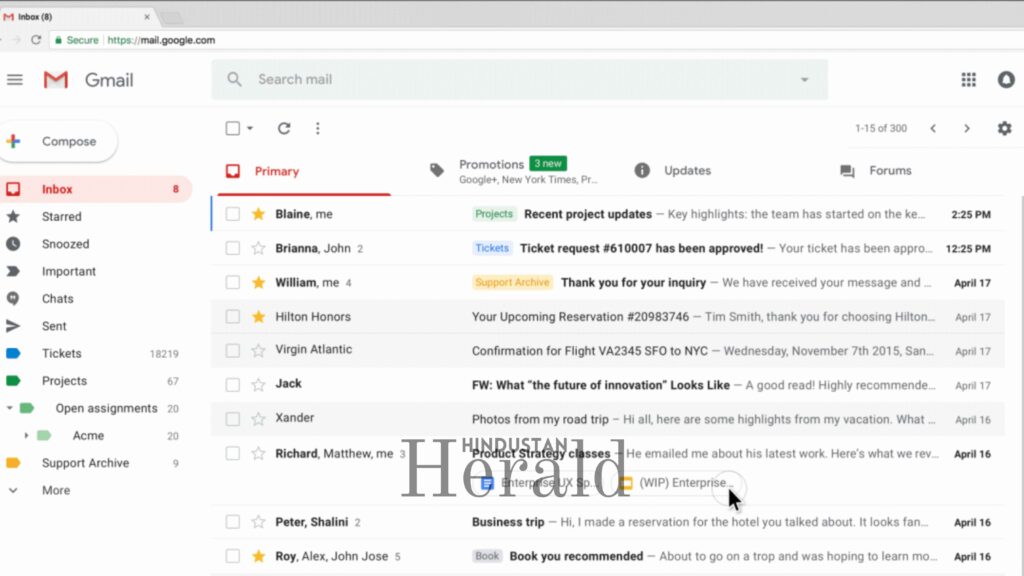
It is called Manage Subscriptions, and the reason so few people know about it is simple: it is hidden inside the sidebar, tucked below Inbox, Starred, and Snoozed, in the section most users scroll past without a second thought.
To find it on a desktop browser, click the three-line hamburger menu in the top-left corner of your Gmail window. Scroll down the left panel. Manage Subscriptions is sitting there, waiting. On Android, it showed up on July 14, 2025, a few days after the web rollout on July 8. iOS users got it on July 21, according to Google’s rollout documentation. By the end of 2025, it had reached virtually all consumer and Workspace accounts.

What the feature actually does is straightforward. It scans your inbox, identifies every sender that has been regularly dropping newsletters, promotions, or mailing list emails into your account, and lines them all up in one view. Each sender shows up with a count of how many emails it has sent you over recent weeks. Next to every name is a single Unsubscribe button. One click, and Gmail handles the rest on your behalf without redirecting you anywhere, without forms, without confirmations. You do not even have to open the email.
On mobile, tapping on a sender’s name in the list shows the most recent emails from that sender. There is an icon to the right of the name that looks like an envelope with a minus sign on it. That is the unsubscribe button. The entire interaction takes about three seconds.
The Other Button That Has Been There Longer
Even before Manage Subscriptions existed, Gmail had already built a one-click unsubscribe mechanism directly into the inbox. If you open an email from a mailing list, look right next to the sender’s name at the top of the message. For most legitimate marketing emails, you will see a small blue “Unsubscribe” link sitting there quietly.
Clicking it does not take you anywhere. Gmail sends an automated request directly to the sender’s system in the background, using a technical standard called RFC 8058 that requires bulk-email senders to support this kind of direct opt-out. Google and Yahoo made compliance with this standard mandatory for anyone sending more than 5,000 emails a day, starting February 2024. Microsoft followed suit for Outlook and Hotmail users from May 2025. Any sender that does not honour the unsubscribe request within 48 hours is technically in violation of these rules.
If you use the Promotions tab, this same link appears even before you open an email. Look at the preview card in your Promotions inbox. There is a small unsubscribe link in the bottom-right corner. One click there does the exact same thing, without you ever having to open the message itself.
What Happens When None of This Works
Not every sender plays along. Older mailing lists, smaller businesses that built their own email systems years ago, and outright spam operations often do not include the RFC 8058 headers that make one-click unsubscribing possible. For those, the only option is the old-fashioned footer link, which may take you to a webpage asking you to confirm your email address, pick from a list of reasons you are leaving, or even log into an account just to stop receiving emails. Some never follow through at all.
For any sender you do not recognise, or never deliberately signed up for, do not click their unsubscribe link. This is worth repeating. Clicking unsubscribe on a suspicious email tells the sender that your address is real, active, and monitored. You may end up on more lists, not fewer. The correct move is to hit Report Spam instead.
Marking something as spam does more than just move that one email. It feeds into Google Postmaster Tools, a system that tracks sender reputation across Gmail’s entire network. Enough spam reports against any sender and their emails start landing in junk folders across millions of inboxes, not just yours.
Filters, for When You Want Something More Permanent
For senders you want to block at scale, particularly brands or domains that send multiple emails a day, Gmail’s filter system gives you more control than one-click unsubscribing ever could.
Click the small sliders icon inside the Gmail search bar. That opens the advanced search panel. Set the “From” field to the sender’s address or their entire domain, something like @brandname.com, and hit “Create filter.” Gmail then gives you a set of options. You can have it archive emails automatically so they never appear in your inbox, delete them on arrival, or route them to a dedicated label if you want the option to read them occasionally without being interrupted by them.
The part that actually makes this useful is the checkbox that applies the filter to all existing conversations matching that sender. You are not just preventing future emails. You are retroactively clearing the backlog.
The Brute-Force Option
For an inbox that has been neglected for years, there is a blunter approach. Search for “category:promotions older_than:6m” in the Gmail search bar. That pulls up every promotional email older than six months. Select them all, including all conversations matching the search, and report them as spam at once.

This trains Gmail’s own filtering system to be more aggressive about similar emails going forward. It is messy, and a handful of newsletters you actually wanted may get caught in the sweep, so checking the spam folder periodically for a week afterward is worth doing. Still, as a once-in-a-while reset, it works.
Why This Matters More Than It Sounds
India has one of the largest Gmail user bases on the planet, and the volume of promotional and subscription email hitting Indian inboxes has grown sharply in recent years. Every e-commerce sale, every fintech onboarding, every edtech platform signup, every food delivery app registration comes with an invisible string attached: a marketing list that may keep emailing you for years after you have forgotten the original transaction.
For many people managing their finances, job applications, government correspondence, or children’s school communications through the same Gmail account, a cluttered inbox is not just annoying. It is how important emails get missed. Payment reminders, interview calls, tax notices, appointment confirmations. They land in inboxes already overwhelmed by noise.
The deeper issue is that third-party unsubscribe apps, which several Indian users have turned to for inbox cleanup, often require you to grant them access to your entire Gmail account. Some handle that access responsibly. Others, as researchers and privacy advocates have documented, analyse your email data and monetise it in ways buried in their terms of service. Google’s native tool removes any need for that trade-off. It works within Gmail, requires no external permissions, and does not ask you to hand over your inbox to solve the problem.
That said, there is one honest limitation worth flagging. Manage Subscriptions processes one sender at a time. There is no way to select fifty senders at once and remove them all in a single click. For someone sitting on years of accumulated subscriptions, that can still mean a fair amount of time. Third-party tools built for bulk unsubscribing remain a practical choice for extreme cases, as long as you read their privacy policies carefully before connecting them to your account.
For everyone else, the fix has been inside Gmail for nearly a year. It just needed someone to point it out.
Stay ahead with Hindustan Herald — bringing you trusted news, sharp analysis, and stories that matter across Politics, Business, Technology, Sports, Entertainment, Lifestyle, and more.
Connect with us on Facebook, Instagram, X (Twitter), LinkedIn, YouTube, and join our Telegram community @hindustanherald for real-time updates.

Tech writer passionate about AI, startups, and the digital economy, blending industry insights with storytelling.
- Neeraj Kapoor

- Neeraj Kapoor
- Neeraj Kapoor
- Neeraj Kapoor